Friday, December 28, 2012

How to use free internet on ufone???


Assalam o Alaikum!
Frinds Today I came with wonderful trick
"How to use free internet on ufone???"
As the name suggest am going to tell you how to use free internet on ufone
For this purpose you have activated mms & gprs on
your ufone SIM. You can check VAS Details from this code.
 *336*1*5#
Now Set your connection according to this configration:
  
  • APN                 :Ufone.Pmms
  • Proxy                :172.16.13.26
  • Port                   :8080
  • Primary dns       :8.8.8.8 
  • Secondry dns    :8.8.4.4
No need for balance for the first activation use with zero balance...
Plz share this trick to your friends thanks............

Wednesday, December 19, 2012

Windows 8 Pro Activator

Windows 8 Pro Activator v1.0 Final  (+ Windows 8 Personalization Enabler)

Windows 8 Pro Activator v1.0 Final (+ Windows 8 Personalization Enabler)  7.76 Mb
Windows 8 Professional Final Activator. This is the latest New Windows 8 100% Working Activator. Try it Now and Activate Your Windows 8 Pro, Enterprise, and Core Final Edition.
This Activator Features:
Fully Unlocked: Personalization,Start screen,,Account Picture
Full Instraction:
  • Run as administrator
  • Wait for the process and dont do nothing
  • It restarts automatically
  • Windows is "activated"
Supported Version:
  • Windows 8 Professional
  • Windows 8 Enterprise
  • Windows 8 Core
Windows 8 Personalization Enabler:
This program will enable the personalization features in the PC Settings.
You will be able to change the account picture,lock screen and the start screen.
IMPORTANT:
IF Windows 8 is Not Activate You must activate windows 8 first using the activator
Before running the personilazion enabler plz close all your applications since your system will automatically restarted.

Download

 Thanks for visiting my blog plz comment if you like my post
Share it.......

Friday, December 14, 2012

Bitdefender antivirus 2012 Register to 2045

Key Features:
  • Defends against viruses and spyware
  • Halts ID theft attempts
  • Filters the links you receive from your Facebook and Twitter friends
  • Gives advance warning of risky websites
Features:
  • Unparalleled Security : Bitdefender capitalizes on live and virtualized behavior-based detection, in addition to cloud-based services, to stop emerging e-threats that other products miss.
  • Active Virus Control : Monitors processes’ behavior while they are running to detect new & unknown viruses
  • New! Rescue Mode : Reboots your computer in a trusted environment, which is used for cleanup and restoration
  • New! Virtualized Browser : Isolates the browser from the operating system in a Bitdefender-provided environment to block web-based threats.
  • Vulnerability Scanner : Checks for missing or outdated security software as well as potentially unsafe system settings.
  • Absolute Silence : Provides a hassle-free experience by making optimal security-related decisions without input from you.
  • New! Autopilot : Bitdefender's Autopilot makes all the security-related decisions for you!
  • Worry-free Socializing : Protect yourself, and your friends, from e-threats that attempt to exploit the trust you’ve built with them.
  • New! Social Network Protection : Filters the links you receive from your Facebook and Twitter friends and monitors your privacy settings.
  • Improved! Search Advisor : Gives advance warning of risky websites right in your Google and Bing search results.
  • Total Privacy : Bitdefender protects your privacy and personal data with a range of specialized modules and functions.
  • Personal Data Filter : Prevents critical data, such as your social security number, from ever leaving your computer.
  • Antiphising : Blocks websites supporting various scams or credit card phishing attempts.
  • Chat Encryption : Keeps your conversations private on Yahoo! and MSN Messenger.
  • Full Speed : Bitdefender 2012 takes “scheduled scanning” to a whole new level, as the scanning only takes place when your system is idle.
  • New! Scan Dispatcher : Triggers system scans when resource usage falls below a certain threshold to avoid any impact on your system’s performance.

Minimal system requirements:
  • Operating system: Microsoft Windows XP SP3 (32 bit) , Vista (SP2), Microsoft Windows 7 (SP1)
  • CPU: 800MHz processor
  • Memory (RAM):
    • 1 GB
  • Available free hard disk space: 1.8 GB free space (at least 800 MB on the system drive)

Recommended system requirements:

  • Operating system: Microsoft Windows XP SP3 (32 bit), Vista (SP2), Microsoft Windows 7 (SP1)
  • CPU: Intel CORE Duo (1.66 GHz) or equivalent processor
  • Memory (RAM):
    • 1 GB (Microsoft Windows XP)
    • 1.5 GB (Microsoft Windows Vista and Microsoft Windows 7)
  • Available free hard disk space: 2.8 GB free space (at least 800 MB on system drive)

Software requirements:

  • Internet Explorer 7 and higher
  • Yahoo Messenger 8.1 and higher
  • Firefox 3.6 and higher
  • Thunderbird 3.0.4
  • Outlook  2007, 2010
  • Outlook Express and Windows Mail on x86
  • .Net framework 3
Thanks for visiting my blog plz comment if you like my post
Share it.......

Thursday, December 13, 2012

Attach nokia with pc and use net with high speed


How to speed up nokia phone modem???
Many of you may use Nokia Phone to connect yourself to internet.Which uses 2G or 3G.This trick will help you in boosting the Internet speed of your Nokia Phone Modem by 100%.Connect your Nokia Phone modem to your PC and connect it to internet by using One Touch Access of Nokia PC suit.Click on the computer activity icon which is similiar to my-computer icon and will be blinking off and on. and will be placed on your task-bar.OTA status of the Nokia modem will be opened. Click on the Properties. Select Configure option from the Properties window. This will open up the Modem Configuration window. Select the Maximum speed available in the Maximum speed option. And press OK to save the settings. Now Disconnect the Internet connection and Reconnect it to avail more speed.

Thanks for watching my blog plz share the post if you like it....

HIDE DATA IN MOBILES WITHOUT ANY SOFTWARE

Have u ever wanted to hide Folders in your phone??? If yes,there here is very interesting solution for you to hide folders in your phone and you dont even need any software for that.This trick can be used for any JAVA phone from Nokia,Samsung,Motorola,LG or any other company.
 
JUST FOLLOW SIMPLE STEPS:
  • Create any new folder or you can use any existing folder that is to be hidden.
  • Rename the folder to any name but with the extension of .jad like if I want to hide my images folder then I will name it as IMG.jad 
  • And thats it!! My orignal images folder which has been renamed with .jad gets hidden and only folder with.jar extension is visible which is empty.So,your data is protected/hidden from unwanted eyes.
  • To unhide the orignal folder you have to remove the .jar extension from the new folder and your orignal folder with all the files and with .jad will become visible.
Thanks for visiting my blog plz comment if you like my post
Share it.......

SPEED UP YOUR NOKIA


This is a crazy simple trick to believe. So dont get away after this point. Your patience will be rewarded.
  • Change your phones’ date to the 01.05.2005
  • Go to the calendar
  • Now we need to create two new to-do’s (Options > New entry > To-do)
  • These two to-do’s need to have the following information:
To-do:

Subject    : Speed
Due date : 04.08.2005
Priority     : High
 
To-do:

Subject    : Qoukie
Due date : 04.08.2005
Priority     : Low
 
Confirm the both to-do notes with “Done”, but don’t close the calendar application.
  • Choose: Options > To-do view
  • Mark “Speed” as done, after that mark “Qoukie” as done.
  • Now you can close the calendar.
  • Change the phones’ date back to the actual day.
  • Enjoy your faster device!
This tutorial is unbelivable, huh? But it really works! Is this an easter-egg built into the S60 OS? To be honest we don’t know, but it works and this is the only important thing…
Tested on 
N73
N97
N95
N85
N78
E63
E66
E71 & 75
N82

To make the list short virtually every phone with S60 & S60 v3 will work. This is a hidden gift of Symbian OS.

Thanks for visiting my blog plz comment if you like my post
Share it.......

Internet Download Manager With Crack


Download IDM with Crack And Enjoy
After Downloading Open Crack And Click on Start
your IDM will be registered for 4ever...


How to reset iPhone passcode???


reset iphone passcode

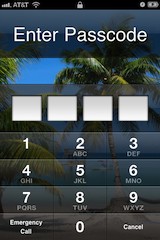
If you forgot your iPhone passcode you can bypass the lock screen completely and reset the passcode by using iPhone recovery mode.
Warning: This will require you to restore your iPhone or iPod touch, this means you’ll lose all data on the device and be back to factory settings.
  • Disconnect the USB cable from the iPhone, leave the other end connected to your Mac/PC.
  • Launch iTunes.
  • Press and hold the Home and Power button on the top of the iPhone to turn off the device.
  • Press and continue to hold the Home button while you reconnect the USB cable to your iPhone, this will cause the iPhone to turn on.
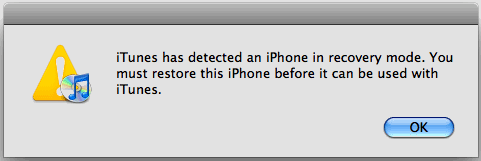
  • Continue to hold the Home button until an alert message in iTunes appears that an iPhone in recovery mode has been detected.

iphone recover mode detected
Now that the iPhone is in recovery mode, you must restore the device:
  • From iTunes, look under the “Summary” tab
  • Click on the “Restore” button within iTunes

This will wipe all files, settings, and apps from the iPhone, including the passcode. When the restore is finished, the iPhone will be at the factory settings. At this point you can choose to start from scratch or to restore the iPhone from a backup.
This tip came from an iPhone repair shop, where it’s common for people to bring in a phone for fixing and then forget to provide the passcode.

Thanks for visiting my blog plz comment if you like my post 
Share it.......

Sunday, December 09, 2012

List of run commands for windows


List of run commands for windows  
Run commands can be used  to boost your working speed. Typing just few words will do your work. Like if you wanna open calculator than you have to go to start->programs->accessories->calc. But if you go by run command then you have to open run->type calc and press enter. This way is more easier then the previous one.So for using run method you need to know all the commands.Run commands can be used  to boost your working speed. Typing just few words will do your work. Like if you wanna open calculator than you have to go to start->programs->accessories->calc. But if you go by run command then you have to open run->type calc and press enter. This way is more easier then the previous one.So for using run method you need to know all the commands.
Here is the list of all run commands:

A

Accessibility Controls – access.cpl
Accessibility Wizard – accwiz
Add Hardware Wizard – hdwwiz.cpl
Add/Remove Programs – appwiz.cpl
Administrative Tools – control admintools
Adobe Acrobat (if installed)- acrobat
Adobe Designer (if installed)- acrodist
Adobe Distiller (if installed)- acrodist
Adobe ImageReady (if installed)- imageready
Adobe Photoshop (if installed) – photoshop
Automatic Updates – wuaucpl.cpl

B

Bluetooth Transfer Wizard – fsquirt

C

Calculator – calc
Certificate Manager – certmgr.msc
Character Map – charmap
Check Disk Utility – chkdsk
Clipboard Viewer – clipbrd
Command Prompt – cmd
Component Services – dcomcnfg
Computer Management – compmgmt.msc
Control Panel – control

D

Date and Time Properties – timedate.cpl
DDE Shares – ddeshare
Device Manager – devmgmt.msc
Direct X Control Panel (If Installed)* – directx.cpl
Direct X Troubleshooter – dxdiag
Disk Cleanup Utility – cleanmgr
Disk Defragment – dfrg.msc
Disk Management – diskmgmt.msc
Disk Partition Manager – diskpart
Display Properties – control desktop
Display Properties – desk.cpl
Display Properties (w/Appearance Tab Preselected) – control color
Dr. Watson System Troubleshooting Utility – drwtsn32
Driver Verifier Utility – verifier

E

Event Viewer – eventvwr.msc

F

Files and Settings Transfer Tool – migwiz
File Signature Verification Tool – sigverif
Findfast – findfast.cpl
Firefox (if installed) – firefox
Folders Properties – control folders
Fonts – control fonts
Fonts Folder – fonts
Free Cell Card Game – freecell

G

Game Controllers – joy.cpl
Group Policy Editor (XP Prof) – gpedit.msc

H

Hearts Card Game – mshearts
Help and Support – helpctr
HyperTerminal – hypertrm

I

Iexpress Wizard – iexpress
Indexing Service – ciadv.msc
Internet Connection Wizard – icwconn1
Internet Explorer – iexplore
Internet Properties – inetcpl.cpl
Internet Setup Wizard – inetwiz
IP Configuration (Display Connection Configuration)- ipconfig /all
IP Configuration (Display DNS Cache Contents) – ipconfig /displaydns
IP Configuration (Delete DNS Cache Contents) – ipconfig /flushdns
IP Configuration (Release All Connections) – ipconfig /release
IP Configuration (Renew All Connections) – ipconfig /renew
IP Configuration (Refreshes DHCP & Re-Registers DNS) – ipconfig /registerdns
IP Configuration (Display DHCP Class ID) – ipconfig /showclassid
IP Configuration (Modifies DHCP Class ID)- ipconfig /setclassid

J

Java Control Panel (If Installed) – jpicpl32.cpl
Java Control Panel (If Installed) – javaws

K

Keyboard Properties – control keyboard

L

Local Security Settings – secpol.msc
Local Users and Groups – lusrmgr.msc
Logs You Out Of Windows – logoff

M

Malicious Software Removal Tool – mrt
Microsoft Access (if installed) – access.cpl
Microsoft Chat – winchat
Microsoft Excel (if installed) – excel
Microsoft Frontpage (if installed) – frontpg
Microsoft Movie Maker – moviemk
Microsoft Paint – mspaint
Microsoft Powerpoint (if installed) – powerpnt
Microsoft Word (if installed) – winword
Microsoft Syncronization Tool – mobsync
Minesweeper Game – winmine
Mouse Properties – control mouse
Mouse Properties – main.cpl

N

Nero (if installed) – nero
Netmeeting – conf
Network Connections – control netconnections
Network Connections- ncpa.cpl
Network Setup Wizard – netsetup.cpl
Notepad – notepad
Nview Desktop Manager (If Installed) – nvtuicpl.cpl

O

Object Packager – packager
ODBC Data Source Administrator – odbccp32.cpl
On Screen Keyboard – osk
Opens AC3 Filter (If Installed)- ac3filter.cpl
Outlook Express – msimn

P

Paint – pbrush
Password Properties – password.cpl
Performance Monitor – perfmon.msc
Performance Monitor – perfmon
Phone and Modem Options – telephon.cpl
Phone Dialer – dialer
Pinball Game – pinball
Power Configuration – powercfg.cpl
Printers and Faxes – control printers
Printers Folder – printers
Private Character Editor – eudcedit

Q

Quicktime (If Installed) – QuickTime.cpl
Quicktime Player (if installed) – quicktimeplayer

R

Real Player (if installed) – realplay
Regional Settings – intl.cpl
Registry Editor – regedit
Registry Editor – regedit32
Remote Access Phonebook – rasphone
Remote Desktop – mstsc
Removable Storage – ntmsmgr.msc
Removable Storage Operator Requests – ntmsoprq.msc
Resultant Set of Policy (XP Prof) – rsop.msc

S

Scanners and Cameras – sticpl.cpl
Scheduled Tasks – control schedtasks
Security Center – wscui.cpl
Services – services.msc
Shared Folders – fsmgmt.msc
Shuts Down Windows – shutdown
Sounds and Audio – mmsys.cpl
Spider Solitare Card Game – spider
SQL Client Configuration – cliconfg
System Configuration Editor – sysedit
System Configuration Utility – msconfig
System File Checker Utility (Scan Immediately) – sfc /scannow
System File Checker Utility (Scan Once At Next Boot)- sfc /scanonce
System File Checker Utility (Scan On Every Boot)- sfc /scanboot
System File Checker Utility (Return to Default Setting) – sfc /revert
System File Checker Utility (Purge File Cache) – sfc /purgecache
System File Checker Utility (Set Cache Size to size x) – sfc /cachesize=x
System Information – msinfo32
System Properties – sysdm.cpl

T

Task Manager – taskmgr
TCP Tester – tcptest
Telnet Client – telnet
Tweak UI (if installed) – tweakui

U

User Account Management – nusrmgr.cpl
Utility Manager – utilman

W

Windows Address Book – wab
Windows Address Book Import Utility – wabmig
Windows Backup Utility (if installed) – ntbackup
Windows Explorer – explorer
Windows Firewall – firewall.cpl
Windows Address Book – wab
Windows Address Book Import Utility – wabmig
Windows Backup Utility (if installed) – ntbackup
Windows Explorer – explorer
Windows Firewall – firewall.cpl
Windows Magnifier – magnify
Windows Management Infrastructure – wmimgmt.msc
Windows Media Player – wmplayer
Windows Messenger – msmsgs
Windows Picture Import Wizard (need camera connected) – wiaacmgr
Windows System Security Tool – syskey
Windows Update Launches – wupdmgr
Windows Version (to show which version of windows) – winver
Windows XP Tour Wizard – tourstart
 Thanks for visiting my blog plz comment if you like my post
Share it.......

How to Change Background Image for Facebook Login Page???


Facebook is currently the biggest online ada where people join and translate each others thoughts and communicate in many different ways by chatting, sending emoticons and sharing images, well now to make some more adjustments we have found an interesting and easy way for changing your Facebook’s login page background image. We tried to do it and applied interesting abstract flower image which you can check below.Facebook is currently the biggest online ada where people join and translate each others thoughts and communicate in many different ways by chatting, sending emoticons and sharing images, well now to make some more adjustments we have found an interesting and easy way for changing your Facebook’s login page background image. We tried to do it and applied interesting abstract flower image which you can check below.Now as you can see in the above image we have changed the background image and style of Facebook Login Page, well now I just applied some random abstract image, you can go with any one applying your personal or with friends image on the background. So now when ever any one opens Facebook.com on your PC if will be greeted by that image with options to Log-In on Facebook.

Steps to Change FB Background Image:-

  • Make sure chrome is installed now install the FB Refresh Extension.
  • After you have installed the extension now just head over to Facebook.com and you will see that page in a new way something like above but obviously not that image, so now you have to click on the small gear icon above the Log In button.
fb-refresh-extension-settings

  • Now after you click on the small Gear Icon you will see window like above asking you to insert the image URL for the image you wanna use for the background (If you wanted to use the same image we have used in the above demo image than you can grab the link here)
  • Now you can choose if you wanna repeat the image and in which direction X for Horizontal and Y for Vertical and than just click on Save Boom, now just navigate to Facebook.com and enjoy the new fresh background.
 Thanks for visiting my blog plz comment if you like my post
Share it.......

Create Killer Facebook Timeline

Facebook Timeline is the one way to spread a nice message or display your creative skills, making it more awesome can be a little problem for the people who are not aware of the xact sizes and other stuff for creating their own personal timeline cover.
facebook timeline cover
  • Coverize.me :- Coverize.me has a good collection of timeline covers in their database so you can just browse their website pick up the one you like and start customizing your facebook profile.
  • Cover Junction :- Cover Junction is another best place for high quality facebook timeline covers online, as said on their website Cover Junction is the place for creating, sharing and discovering high quality facebook covers online.
  • Timeline Cover Banner :- Timeline Cover Banner gives you a lot easir options for awesome customizations, you can write on the images, add some cool graphics and create collages out of your images for your facebook timeline cover. They mention that it’s the best place for creating fun and business covers online.
  • Face Coverz :- The best thing about Face Coverz is that they are providing a list of covers aranged in categories from A-Z or in any modern names like you can choose Fun and Horror I mean its bit simple for easier searching.
  • The Site Canvas :- This is another good one, template choosing option is there, re arrange all the images if you wanna give them a shuffle. Pretty good and simple to use.So here you go with few websites we got into our knowledge that will help you in creating a good and impressive facebook timeline cover, if you have more sites do comment below we will post those websites too updating this post and giving credit to you.
 Thanks for visiting my blog plz comment if you like my post
Share it.......

How to Post Animated GIF Images on your Facebook Wall???

Facebook still does not allow you to upload your GIF Images directly using the photo uploading option they normally provide, but well there are some application on Facebook that enable you too post these kinds of images on your or your friends wall.With Animated-Picture for Facebook you can post animated GIF Images either using images in their own database or uploading and using your personal images through the URL option they provide. So now just check out the steps below on how you can also enjoy this awesome GIF images posting on Facebook.
Here is the full tutorial:-  
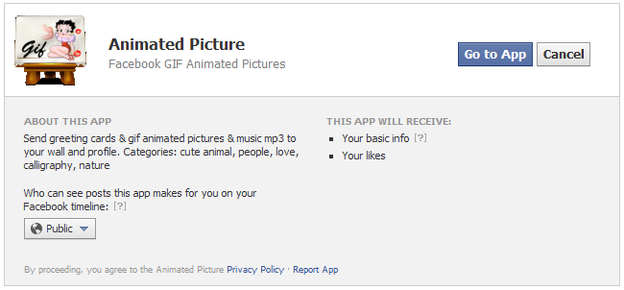
  • Make sure you are signed in on Facebook and than visit the Animated-Picture Facebook Application page.
animated-picture-app
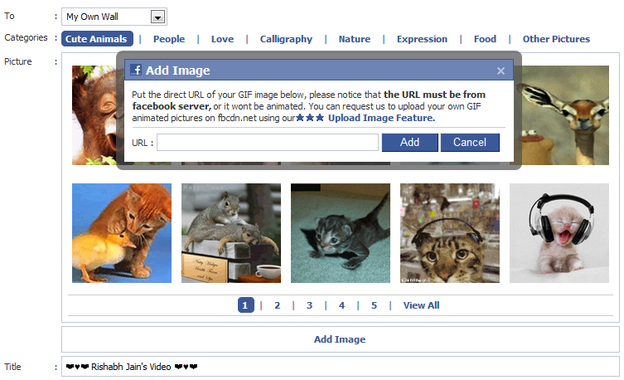
  • Now just click on the Go to App button and you will be in their interface, now you can either select images from their own database or you can put the URL of the animated GIF Image hosted somewhere else.
animated-picture-app
  • So now if you do not have any image hosted outside you can go for their images in their database divided into different categories, so you can check out images from cute animals, if you are romantic you can go for the Love and so on.
facebook-status-share
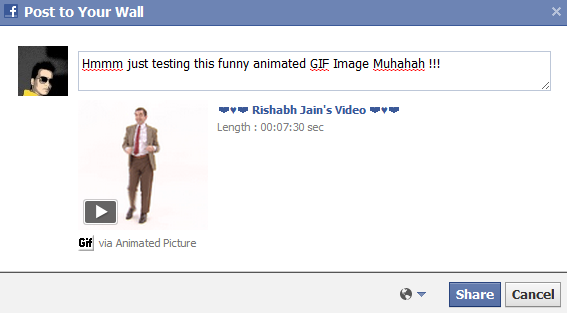
  • So now when you are done choosing your image which you are gonna share just click on it and you will a popup like above asking you too enter the title you wanna display as your status while the image animated below.
  • Now just click on share and that’s it your animated image is now live right on your wall. Well there are some images which might not work, or your friends have to click on them for the redirection well I am still finding any other good app which works more perfectly till than have fun...
 Thanks for visiting my blog plz comment if you like my post
Share it.......

Create your own Images as Emoticons for Facebook Chat

Smileyti.me
Today I told you how you can send your image in Facebook chat the images can be created using a simple online website called “Smileyti.me”. Now it’s a simple image uploading and emoticon conversion website which will simply create some different codes for your images when they are complied together you get your image drawn right in front of your eyes.So now I have a created a Gif image for helping you out in uploading your image and using that website below so now just follow below steps and have fun creating your own funny images.
Steps:-
  • Just visit there website http://smileyti.me/
  • Now you will see page asking you to choose your image and than entering that irritating captcha you can follow below .gif image we created uploading our default website logo.
Smileyti.me-Image-Emoticons
  • Now after you upload your image you will get your code like below.
Smileyti.me-Code
  • Now that’s your final code, just copy this code and paste it in your Facebook chat and you will see your image rendering simply perfect.
Thanks for visiting my blog plz comment if you like my post
Share it.......

Wednesday, December 05, 2012

How To Download Android Paid Apps And Games for Free ?


Assalam o Alaikum, Ali is here.As you all know today android phones are more common in our Pakistan, we can see android phone in everyones hand today.So using Android phone is very good because it can provide us very attractive and interesting application most of the applications can be downloaded for free but the really amazing one are not available for free so we thaught need to do something to download paid free apps and games.


We can Download free games and apps for android from Android Market but some of the games and apps are paid and they are more intresting but we are not interested in paying for apps cause they are just for fun so I bring a trick to download free apps and games that are paid on Android Market.


Instruction:
This trick is very simple you dont need to do many things you just need to install an application on your phone the applicaton is called Black Market Alpha.Observe the proof that screen shots watch it carefully the prize of the apps are canceled with a line, that means its free.
Screenshots Of Black Market Alpha:


Don't Forget to Like my page on Facebook and Invite your Friends to Like to page, Your Like's are inspiration to us and Also Comment about the posts.

How To Know Who Unfriend You On Facebook???

Today Facebook is the largest social networking site. Almost everyone who uses Internet are having Facebook account.Facebook so that your social networking skills could develop and you will have good online Friends.Guys remember one thing don't accept a friend request from an unknown people on Facebook cause they can be  psychic who will post abusive things on your wall or may be an hacker who will take your personal information for any destructive purpose.

How to Know Who Unfriend Us ???

So friends as we all know that Facebook does not provide information about who unfriend us and who have visited our profile ? and we all are curious to know these things because it seems to be quite annoying that someone has unfriend us so i am going to tell you the way to recognize who have unfriend / blocked us.
Follow my instrutions:-
    • 1st of all visit this site.
    • Now you are in the site.
    • Tick Here To use this servise you have to accept the Terms of Use 
    • Now it will access your facebook account.
    • Log in to u your account & press allow.
    Now the site will show ur friendz and peoples who unfriends u
    Thanks for visiting my blog plz comment if u like my post also share it..

    Sunday, December 02, 2012

    Transparent lock to your windows Desktop

    Locking your computer is a good idea when you are away from your pc, Yep!!! i know you can simply do this by using windows shortcut key “win+L” on your keyboard. It will lock your screen but the bad thing is, it will hide your screen and you can’t see the status of the hidden screen. This problem can be solved by using ClearLock, So in this post i will tell you how to use ClearLock and how to hack it ;)
    ClearLock is a handy software which protects you system from crazy dudes or lousy pets who thinks your keyboard as a playground. By using ClearLock you can lock your desktop computer with a transparent lock, that means you can actually see your desktop which is covered by a transparent layer, But you can’t click on anything until you give your password to remove the lock.


    It is handy when you are downloading files which requires to check their downloading status every minute or when your showing your presentations to your friends while you got other work etc..,
    So if you wish to download ClearLock you can download it from Here Secret to get access without authorization.First promise me that you don’t tell this trick/hack to anyone ;). Ok lets get straight to the point, to get access without password just follow these simple steps.
    Lets Start:
    • While it is asking for password enter anything you wish and press enter, you will get an error message. Continue to do it for another 2 times.
    • After the three attempts ClearLock will Completely block you from entering any passwords. So what to do Picasa Content now!!!
    • Here comes the real play, when it blocked you from entering password press Ctrl+Alt+Del, it will open the task manager, Now select Applications > ClearLock and press End Task.
    • Tadaa, you got access without password.
     Thanks for visiting my blog plz comment if you like my post
    Share it.......

    Send Colourfull alphabets in Facebook Chat


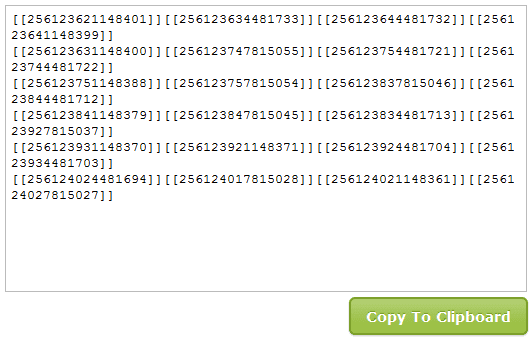
    Asalam o Alaikum  Friends.I am Ali today i'll tell u how to post colourful alphabets in Facebook chat Now Guys you can also write message to your friend in this type of Style....COLOUR FULL letter.. Here Is the Tricks.. Copy the below code related to alphabet and paste it where u wana send......!!!

    [[244961858909298]] = A

    [[344113652270150]] = B

    [[344991278847613]] = C

    [[164461493653696]] = D

    [[196752423751220]] = E

    [[301630573215430]] = F

    [[251496118250464]] = G

    [[266394220086654]] = H

    [[164866556948132]] = I

    [[180599335371968]] = J

    [[209067005843651]] = K

    [[238594039545396]] = L

    [[147702285338528]] = M

    [[309221402452022]] = N

    [[180901405340714]] = O

    [[246506925416551]] = P

    [[333343613344059]] = Q

    [[123128367803569]] = R

    [[316143388416019]] = S

    [[334073456605673]] = T

    [[199626093460643]] = U

    [[224202614323263]] = V

    [[336032459740792]] = W

    [[205228226232732]] = X

    [[142420399202282]] = Y

    [[157919817645224]] = Z
      

     Thanks for visiting my blog plz comment if you like my post
    Share it.......

    Different Types of Virus and Worms Explained

     
    System Sector Viruses 
    System sectors are special areas on your disk containing programs that are executed when you boot (start) your PC. System sectors (Master Boot Record and DOS Boot Record) are often targets for viruses. These boot viruses use all of the common viral techniques to infect and hide themselves. They rely on infected floppy disk left in the drive when the computer starts, they can also be “dropped” by some file infectors or Trojans.

    Stealth Virus
    These viruses evade anti-virus software by intercepting its requests to the operating system.
    A virus can hide itself by intercepting the anti-virus software’s request to read the file and passing the request to the virus, instead of the OS. The virus can then return an uninfected version of the file to the anti-virus software, so that it appears as if the file is “clean”.
     

    Bootable CD-ROM Virus
    These are a new type of virus that destroys the hard disk data content when booted with the infected CD-ROM.
    Example: Someone might give you a LINUX BOOTABLE CD-ROM.
    When you boot the computer using the CD-ROM, all your data is gone. No Anti-virus can stop this because AV software or the OS is not even loaded when you boot from a CD-ROM.
     

    Self-Modification Virus
    Most modern antivirus programs try to find virus-patterns inside ordinary programs by scanning them for virus signatures.
    A signature is a characteristic byte-pattern that is part of a certain virus or family of viruses.
    Self-modification viruses employ techniques that make detection by means of signatures difficult or impossible. These viruses modify their code on each infection. (each infected file contains a different variant of the virus)
     

    Polymorphic Code Virus
    A well-written polymorphic virus therefore has no parts that stay the same on each infection.To enable polymorphic code, the virus has to have a polymorphic engine (also called mutating engine or mutation engine). Polymorphic code is a code that mutates while keeping the original algorithm intact.
     

    Metamorphic Virus
    Metamorphic viruses rewrite themselves completely each time they are to infect new executables. Metamorphic code is a code that can reprogram itself by translating its own code into a temporary representation, and then back to normal code again.
    For example, W32/Simile consisted of over 14000 lines of assembly code, 90% of it is part of the metamorphic engine.
     

    File Extension Virus
    File extension viruses change the extensions of files. .TXT is safe as it indicates a pure text file. With extensions turned off if someone sends you a file named BAD.TXT.VBS you will only see BAD.TXT.If you’ve forgotten that extensions are actually turned off, you might think this is a text file and open it. This is really an executable Visual Basic Scriptvirus file and could do serious damage .
    Countermeasure is to turn off “Hide file extensions” in Windows.

    That’s it…


     Thanks for visiting my blog plz comment if you like my post
    Share it.......

    Top reasons to use ubuntu instead using windows


    Its very common that many people argue why should you use ubuntu or other Linux distro when you are in the world of windows or mac(even i asked the same question when i got a thought to change to ubuntu linux). So why should you use ubuntu(or just give it a try).I also heard while so many people saying that linux sucks because it doesn't provide a good user interference and should deal with command lines, but its not true because ubuntu and other linux distro had changed a lot and even provides a good user interference. So, as a ubuntu lover i would like to give some reasons why you should use ubuntu or other linux distros(at least give it a try).

    Its free: Yep!! ubuntu or other linux distro's are free and will be free always. They will surely save some grands isn't it.

    No virus: When compared to windows ubuntu or other linux distro's are 99% more secure because linux will not recognize win32 executable's.

    Evolve: By using ubuntu or other linux distributions you can evolve yourself in computing and internet.

    Great performance: When compared to windows, ubuntu uses less system resources and gives you smooth performance. Unlike windows ubuntu runs on old pc's too.

    Bug fix: You don't have to wait your life to get bugs fixed, you can track them easily from ubuntu community.

    Free softwares: You don't have to use your dollars to buy softwares because all softwares are free!!! So that you are free from pirated softwares.

    Highly Customizable: You can totally customize your desktop and other parts of ubuntu with ease, you can also make its desktop look like windows or mac or you can be more crazy with your own customization.

    Easy Upgrades: Yes its true that you don't have to waste your time to upgrade your softwares individually because you can do it with only one application called update manager, thus using less system resources and getting great performance.

    Ubuntu community: One of the greatest and biggest community which helps in providing you with support and answers to your questions and doubts.

    All in one: You don't have to install different softwares like MS office, chat applications, photo editing etc..., because ubuntu comes with free(equal and even better then your paid softwares) and pre installed softwares, So that you can start your work right away.

    Games: Who said linux is not for gamers, linux has 100's and 1000's of games which you can get for free of charge i.e they are open source.

    The reasons i showed here are just foot of a mountain, if you are a ubuntu or linux lover(windows and mac user too) share your views.
    Hope you enjoy linux distro's and please support ubuntu.

    Thanks for visiting my blog plz comment if you like my post
    Share it.......
    Protect Your Computer From USB Viruses-Top 5 Security Tips

    With increasing anti-virus security in place against email-aware viruses and malware, hackers are turning their attention to less well-defended routes such as USB drives. This is the latest method that’s used by hackers to torment innocent users. However, there are ways you can protect your computer from USB and Pen drive viruses.

    1.Block USB Viruses


    Invest in an excellent anti-virus program that has built in USB virus scan and remover. These anti-USB virus scan programs not only protect your computer from USB Autorun viruses but can also clean worms, Trojans and viruses in your USB memory sticks.You can try anti-virus programs for USB virus such as USB Virus Scan, USB Drive Antivirus and so on.
     

    2.Disable Your Computer’s Autorun Feature
     

    When you plug in a USB drive stick into your system, the Autorun feature initiates automatically. If your USB contains any virus programs, it’ll use the Autorun feature to infect your computer. To protect your computer, disable the Autorun feature.You can disable the Autorun feature via the Control Panel.
    Alternatively, you can use antivirus software to disable and enable the Autorun feature whenever you want. Additionally, these USB blocking softwares allow system administrators to specify which removable storage drives users can access.

    3.Update Your Device Driver

    Keeping your USB device driver updated is a good way to ensure greater stability for your USB drives. While this won’t help eradicate USB viruses, USB device drivers are constantly updated to block viruses and deliver timely warnings. You can update your USB device drive from your Windows Computer Management feature in the Control Panel.

    4.Use USB Firewall Software

    USB firewalls prevent Windows OS from processing malicious programs when a virus infected portable USB device is opened. USB firewalls monitor only your USB devices, and not your CD and DVD drives. By using USB firewalls, you’ll be enabling a basic level of protection from the autorun.inf viruses that spread from portable USB devices.

    5.Always Safely Remove USB Devices

    Viruses are sometimes created via damaged documents. If you are transferring a set of files to your USB drive, make sure the transfer is complete before you eject the device. Always use the Safely Remove Hardware feature of Windows OS. This is because partially transferred or damaged files can in turn corrupt other files on your USB drive.


    Thanks for visiting my blog plz comment if you like my post
    Share it.......